

Picture this:
You're about to learn everything about "Design Software – The Top 5 Applications" — without the jargon, without the fluff, and with at least one dad joke that'll make you groan. Grab your coffee. Let's go.
Key Takeaways
6 min read
- 1What you need to know before printing
- 2Common mistakes to avoid
- 3How to get the best results
As a child, drawing was my favourite pastime, especially during dull moments like lunch with my mom and her friends or long phone calls. All I needed was paper and a pen or pencil to keep myself entertained. This love for art led me to pursue it as a career, with technology adding exciting new dimensions to being an artist or designer.
Here's the reality: being a designer today requires proficiency in several programs. You'll need to create not only on paper but also digitally. Unfortunately, I wasn't prepared for the high cost of these programs, especially the Adobe Suite. To avoid going bankrupt, I searched for affordable alternatives and found these top free design software programs that won't break the bank.
<AcademyProTip> Start with one free program and master it completely before moving to the next. You'll build confidence and skills without overwhelming yourself with too many interfaces at once. </AcademyProTip>
1. Inkscape#
This highly capable editor is ideal for vector art lovers and focuses on the SVG format as its primary file format. Inkscape sports some advanced features that aren't always available in other apps – such as alpha blending, cloned objects and markers.
It boasts full support for different colour modes, making it a viable alternative to Adobe Illustrator for both print and <a href="https://studio.printulu.co.za" class="internal-link text-[#007756] hover:text-[#005d42] underline font-medium">web design</a>. It may have a smaller interface than what you'll find with the Illustrator app, but you'll still be able to create highly sophisticated artwork with this beauty.
2. Krita#

Mouse by Coyau - designed in Krita
_Mouse by Coyau – Designed in Krita_
Krita is an open-source painting tool that's been in development since 1999. It was created by artists for artists, with the specific belief that anyone should be able to access top-quality drawing software. It comes with a full set of brushes suitable for a wide variety of work.
Features worth noting include brush stabilisers to smooth out any shaky lines, vanishing points, a wrap-around mode for creating seamless textures and patterns, and a pop-up palette for quick colour-picking. No wonder this one has so many fans.
3. Canva#
At Printulu, we often recommend Canva to our clients because it's so versatile, user-friendly and absolutely free. It has an intuitive drag-and-drop editor that you definitely don't need to be a professional to use. The built-in templates help you start a project quickly, making it perfect for non-professionals.
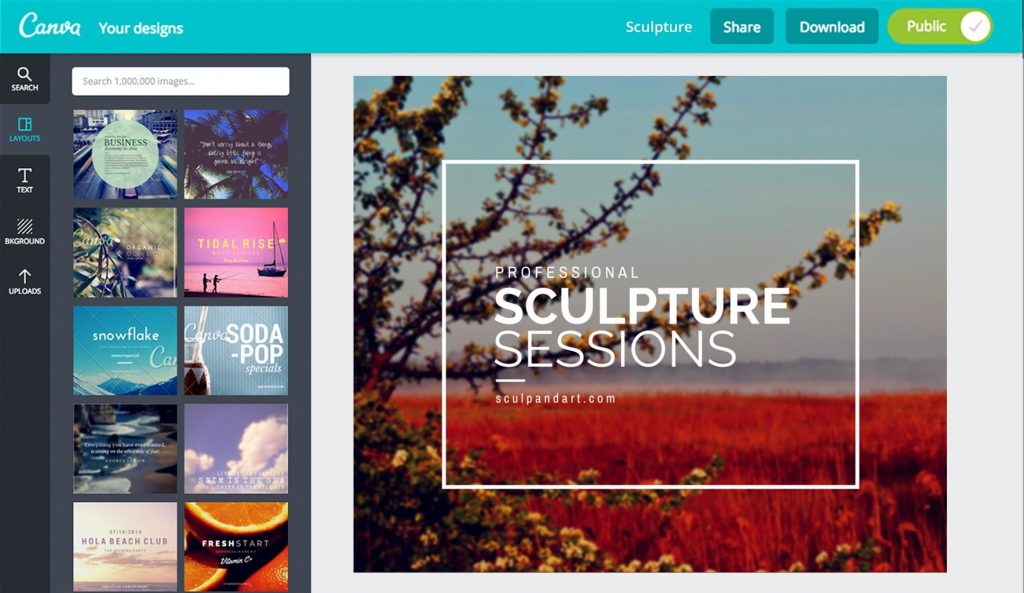
canva design software printulu
Canva is a photo editor, colour palette tool, font combination picker and photo collage maker all in one. My personal favourite aspect of Canva is that it offers loads of free design elements, fonts and photos at your fingertips. Give it a try – I guarantee you'll be sitting and designing gorgeous graphics for hours of fun!
4. GIMP#
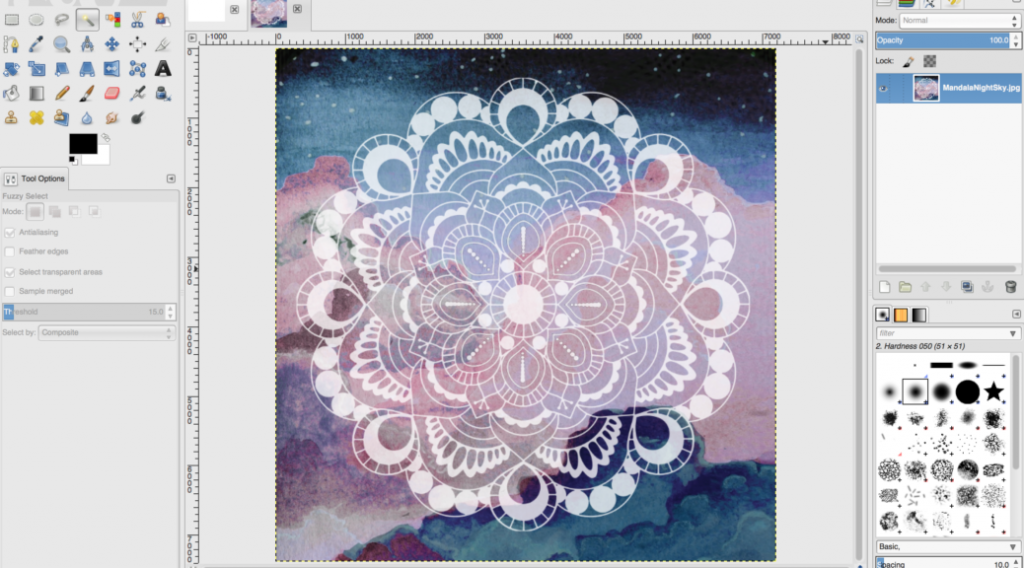
print ready artwork printulu
GIMP is like Photoshop's free, user-friendly cousin. The interface is slightly different, but if you have Photoshop knowledge and prefer this kind of interface, GIMP is the way to go. It has a full suite of features available, such as colour correction, cloning, selection, enhancement and paint tools. This design software even has a built-in file manager and is compatible with the most popular file formats.
It's absolutely packed with advanced brushes, filters, layers and masks. GIMP is prime design software for anyone who works with photos and has a habit of becoming people's favourite.
<AcademyQuote> The best design software is the one you'll actually use consistently. Don't get caught up in having the "perfect" tool – focus on mastering the fundamentals with whatever program feels right for you. </AcademyQuote>
5. Blender#
I was one of those people who believed that if you want to design 3D art, you're going to have to shell out some big bucks. I'm very pleased to find that I was wrong. If you're serious about 3D art but struggling to afford professional design software like Cinema 4D and Houdini, then you're in luck. Blender is a free, open-source 3D content creation suite, available for all major operating systems.
Animators use Blender to create short films and sometimes even feature films, and for good reason. It's a highly competent tool for anything 3D, including modelling, texturing, animation, rendering and compositing. The interface may seem slightly intimidating at first, and it's not as intuitive to learn. But remember that it's fully customisable so that it suits the way you want to work.
**6. Instasize (You can also use Remove BG)**#

INSTASIZE
For creatives who need to polish photos on the go, one of the best mobile editing apps is Instasize. Originally created as a pure crop and resize tool, it now acts as an all-in-one kit. Users can take a new photo within the app itself or import it from their phone storage, then choose from a variety of features to post-process it for uploading online.
It contains all basic editing options: cropping, colour filters, advanced sliders for things like saturation and hue, beauty tools, borders, and text. iOS also adds basic video editing to the mix, making it effective for quick, high-quality edits in one sleek interface. This app is downloadable from the App Store or Google Play.
It may not always be cheap to be a graphic designer. Especially if you love your Starbucks and buy stationery until your wallet is screaming at you to stop. Luckily for us, not everything has to cost you an arm and a leg. And remember, when you're done with your creative designs, send them over to the Printulu family at support@printulu.co.za so that we can print them out for you at top quality, without making a further dent in your pocket.
<AcademyDadJoke> Why did the designer break up with their expensive software? Because they found a free alternative that didn't cost them their relationship with their bank account! </AcademyDadJoke>
There are several reasons why you might choose to use free design software:#
- Cost: Free design software is, as the name implies, free of charge. This can be a major consideration for individuals, hobbyists, or small businesses with limited budgets.
- Accessibility: Free design software is typically available to download online, making it accessible to a wide range of users.
- Functionality: Many free design software programs offer a range of features and functionalities, making them suitable for a variety of design tasks.
- Community: Open-source software often has a strong user community, providing support and resources for users.
- Learning opportunities: Free design software can be a great way for beginners and students to learn about design and try new software before committing to a paid version.
However, free design software may not always have the same level of features or support as paid software, and may not be suitable for all design tasks.
[
Blog_Notification_DesignBanner
You might also like…#
- Top design websites for non-designers
- 10 Design Do's and Don'ts
- Why Graphic Design is Useless! (Revealed)
- How to Write an Effective Design Brief
- 4 Ways to Save Money on Graphic Design (It Doesn't Have to be Expensive)
[![Subscribe <a href="https://www.printulu.co.za/product/banners?utm_source=blog&utm_medium=content&utm_campaign=internal" class="internal-link text-[#007756] hover:text-[#005d42] underline font-medium">banner</a>](https://www.printulu.co.za/blog/wp-content/uploads/2019/05/Newsletter_Subscribe-01-1024x255.png)](https://hello.printulu.co.za/newsletter-subscription-1)