🎨Designer🤝Reseller

Canva Setup – Design Print-Ready Artwork!

By Printulu3 minute read
Side view of concentrated female employee wearing casual clothes and eyeglasses standing near scanner and copying documents while working and looking at camera

Picture this:

You're about to learn everything about "Canva Setup – Design Print-Ready Artwork!" — without the jargon, without the fluff, and with at least one dad joke that'll make you groan. Grab your coffee. Let's go.

Key Takeaways

3 min read

  • 1Step 1: File setup
  • 2Step 2: Save with Bleed
  • 3Frequently Asked Questions
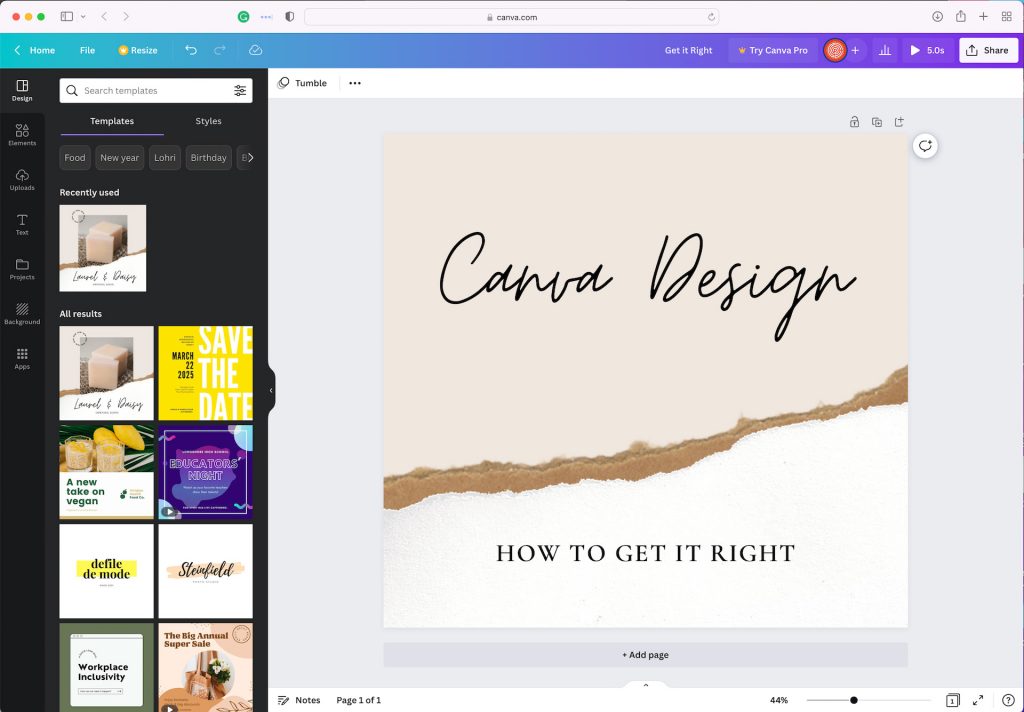
Canva-Design

Canva-Design

Yes, you can absolutely create <a href="/blog/print-ready-file-guide" class="internal-link text-[#007756] hover:text-[#005d42] underline font-medium">print-ready</a> artwork in Canva — but you'll need to avoid the biggest trap most designers fall into. Skip those tempting Canva templates! They're built for American standard sizes, not the South African sizes you actually need for local printing.

<AcademyProTip>Always start with custom dimensions in Canva. This simple step saves you from sizing headaches later and ensures your design fits perfectly on South African standard <a href="/blog/paper-size-guide" class="internal-link text-[#007756] hover:text-[#005d42] underline font-medium">paper sizes</a>.</AcademyProTip>

Here's how to set up Canva properly for print-ready artwork that'll make your printer (and your clients) happy.

Step 1: File setup#

Create a design button > Custom Size > Enter the ordered size of the product > Design your product.

This isn't just about getting the right dimensions. You're laying the foundation for professional results that match what South African printers expect to receive.

Step 2: Save with Bleed#

Getting your export settings right is crucial. Here's the exact sequence:

  1. Select Share (Top Right)
  2. Select Download in the drop-down <a href="https://www.printulu.co.za/product/menus" class="internal-link text-[#007756] hover:text-[#005d42] underline font-medium">menu</a>
  3. File Type PDF Print
  4. Select Crop Marks & Bleed
  5. Select Flatten PDF
  6. Select Download

<AcademyQuote>Bleed isn't optional — it's your insurance policy against white edges appearing on your finished prints.</AcademyQuote>

Here's where most people stumble. Canva is a digital design studio which means it works in RGB colour mode. You'll need to convert your artwork to CMYK before uploading it to your printulu order.

You can upload your artwork here and follow the onscreen prompts.

This conversion step isn't just technical nitpicking — it's what prevents your vibrant screen colors from looking dull and disappointing in print.

Read More: [Design canva <a href="https://www.printulu.co.za/product/deskpad-calendars" class="internal-link text-[#007756] hover:text-[#005d42] underline font-medium">calendars</a> that suit your client's brand](https://www.printulu.co.za/blog/canva-calendars-design/)

Get Printing Tips in Your Inbox

Join 5,000+ South African businesses. Weekly insights, no spam.

Frequently Asked Questions

Can I use Canva to design print-ready artwork?

Absolutely! Canva works brilliantly for print artwork. The catch? You'll need to convert from RGB to CMYK before printing. Use free tools like PDF2CMYK to handle this conversion. Always set your design to the correct print size with 3mm bleed — this isn't optional if you want professional results.

What size should I set in Canva for print?

Set your Canva design to the exact finished size of your product, then add 3mm bleed on all sides. For example, if you're printing A4 (210mm x 297mm), set your canvas to 216mm x 303mm. This extra space ensures your design extends to the edge after trimming, preventing any white borders.

How do I export Canva designs for print?

Export as "PDF Print" from Canva — this gives you the highest quality output. Select "Crop marks and bleed" if it's available in your version. Then convert the PDF from RGB to CMYK using a tool like PDF2CMYK before uploading to Printulu. This two-step process ensures your colors print accurately. <AcademyDadJoke>Why don't printers ever get stressed? Because they always know how to handle the pressure!</AcademyDadJoke>

Why do my Canva colors look different when printed?

Your screen uses RGB color mode (perfect for digital), while printers use CMYK (designed for ink). RGB can display more vibrant colors than CMYK can reproduce, so those eye-popping screen colors often appear more muted in print. Always convert to CMYK before printing, and request a print proof for color-critical projects where accuracy matters most.
P

Written by

Printulu Team

South Africa's Leading Online Printing Experts

The Printulu team brings decades of combined experience in the South African printing industry. From business cards to large-format banners, we help thousands of businesses and individuals get professional printing results — delivered fast, priced right, and printed with pride in South Africa.

Share:

Keep Learning

Brochures – The Ultimate Guide

Creating print-ready brochures is super easy, here is a quick video that takes you through designing brochures step-by-step. Here are the things you need to look out for: Size: The size of your ordered product is the size of your end product, the artwork size should be exactly the same Image Quality: Images must be

5 min read

How to Make A Print Ready Artwork: Your Easy Checklist (Complete List)

Print Ready Artwork Checklist: What do I need to know about print-ready artwork? When creating print-ready PDF files, there are many things to consider. To name just a few: file format, font size and trimming area are all crucial elements that ensure a quality print. You may be asking, ‘Why is printing so complicated? Why

6 min read

7 Must-Follow Graphic Design Do's and Don'ts for Stellar Sticker Artwork

Stickers are an effective and fun way to promote your brand, showcase your creativity, and engage with your audience. Whether you’re designing stickers for personal or business use, it’s important to follow certain graphic design principles to ensure that your artwork stands out, communicates your message effectively and most importantly is print-ready. In this post,

7 min read