

Picture this:
You're about to learn everything about "Graphic Design Software Basics Create Perfect Prints 100% Of The Time" — without the jargon, without the fluff, and with at least one dad joke that'll make you groan. Grab your coffee. Let's go.
Key Takeaways
4 min read
- 1What you need to know before printing
- 2Common mistakes to avoid
- 3How to get the best results
Graphic Design Software Basics: Create Perfect Prints 100% Of The Time#
You can master any graphic design software, but without understanding the fundamentals, you'll still struggle with <a href="/blog/print-ready-file-guide" class="internal-link text-[#007756] hover:text-[#005d42] underline font-medium">print-ready</a> files. The key isn't just knowing how to use Photoshop or CorelDraw – it's knowing which tool to use for what.
Recently, I got a call from a frustrated designer who couldn't export a CMYK file from Photoshop. Despite her experience, she was stuck on this basic step. Don't feel bad if this sounds familiar – design schools often skip these crucial printing fundamentals. After 20 minutes of phone troubleshooting (which tested both our patience), she finally nailed it. Her [<a href="https://www.printulu.co.za/product/deskpad-calendars?utm_source=blog&utm_medium=content&utm_campaign=internal" class="internal-link text-[#007756] hover:text-[#005d42] underline font-medium">calendars</a>](https://www.printulu.co.za/product/search?utm_source=blog&utm_medium=content&utm_campaign=internal?s=calendars?utm_source=blog&utm_medium=content&utm_campaign=internal) turned out beautifully, but the whole experience got me thinking.
<AcademyProTip> Check our help centre for print-ready artwork guidelines covering Adobe Illustrator, Photoshop, InDesign and CorelDraw – bookmark it for quick reference. </AcademyProTip>
Here's what I've realised: many people don't know which program works best for what. I've had clients ask how to create logos in Photoshop, then wonder why everything pixelates on their large format prints. This isn't their fault – these are design school basics. If you haven't studied design formally, how would you know?
Think of it like Microsoft Office. You wouldn't write an essay in Excel or create spreadsheets in Word, right? Same principle applies here. Each design program has its sweet spot.
First thing first: There is a major difference between vector and raster files.#
Vector Images.#
Vector images are your printing best friend. They're built from mathematical paths, lines and curves – which means they can scale infinitely without losing quality. No pixelation, ever.
Want to spot a vector? Look at the edges. Zoom in as much as you like – they'll stay crisp and smooth. Text is the perfect example. Make your font massive, and it'll never look fuzzy or undefined.
<AcademyQuote> Vector graphics use mathematical formulas to maintain perfect quality at any size – from{" "} <a href="https://www.printulu.co.za/product/business-cards?utm_source=blog&utm_medium=content&utm_campaign=internal" class="internal-link text-[#007756] hover:text-[#005d42] underline font-medium" > business card </a>{" "} to billboard. </AcademyQuote>

What's so great about vectors?#
Besides infinite scalability, vectors are incredibly file-size efficient. Since they're defined by mathematical descriptions rather than individual pixels, the files stay compact. This makes them easy to share and store.
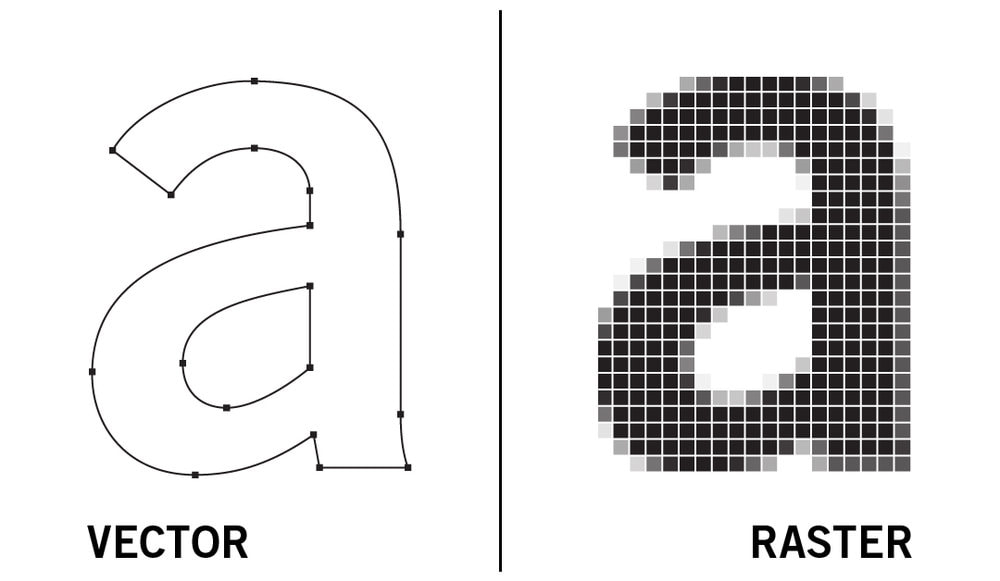
Vecotr vs raster image
Raster Images.#
Raster images (bitmap images) are made from tiny pixel squares. Zoom into any photo on your phone – you'll see them eventually. Raster works brilliantly for photographs and detailed graphics with subtle colour gradations. The trade-off? Larger file sizes and resolution limitations.
Adobe Illustrator for Graphic Design.#
I'll be honest – Illustrator is my favourite. Every designer has preferences, and mine leans toward this vector powerhouse. When you need print-ready artwork, vector is where you want to be.
Logos, typography, packaging, infographics, <a href="https://www.printulu.co.za/product/posters?utm_source=blog&utm_medium=content&utm_campaign=internal" class="internal-link text-[#007756] hover:text-[#005d42] underline font-medium">posters</a> – if it needs to scale perfectly, Illustrator's your tool.

Photo Cred: educba.com
Adobe Photoshop Visual Manipulation.#
Here's where those logo-in-Photoshop clients go wrong. Photoshop works exclusively with raster images. Create a logo here, and it'll pixelate the moment you scale it up. Seriously, avoid Photoshop for logo design.

Photo Cred: engadget.com
What is Photoshop ideal for?#
Photo editing and digital painting. Photoshop excels at manipulating pixel-based images through its layer system. Each layer can be edited independently, giving you incredible control over image manipulation. Just make sure you know how to export correctly for different uses.
<AcademyDadJoke> Why don't graphic designers ever get lost? Because they always know which path to take! (Vector paths, that is.) </AcademyDadJoke>
Adobe InDesign Lay-out Design.#
InDesign handles single or multi-page documents beautifully. It's your go-to for layout work – think [<a href="https://www.printulu.co.za/product/brochures?utm_source=blog&utm_medium=content&utm_campaign=internal" class="internal-link text-[#007756] hover:text-[#005d42] underline font-medium">brochures</a> and booklets](https://www.printulu.co.za/product/brochures?utm_source=blog&utm_medium=content&utm_campaign=internal). While InDesign is vector-based, always import high-resolution images to maintain print quality.

Photo Cred: comidoc.com
CorelDraw For Graphic Design.#
CorelDraw is another solid vector editor. There's usually a bit of rivalry between CorelDraw and Illustrator users – they're similar enough to spark debates. While Illustrator might be the industry standard, CorelDraw definitely holds its own.

Photo Cred: pcmag.com
Further Reading:
Related Articles:
