

Picture this:
You're about to learn everything about "Augmented Reality Printing – 5 Things You Should Know" — without the jargon, without the fluff, and with at least one dad joke that'll make you groan. Grab your coffee. Let's go.
Key Takeaways
5 min read
- 1What you need to know before printing
- 2Common mistakes to avoid
- 3How to get the best results
What is Augmented Reality Printing?#
Augmented reality printing bridges the gap between your physical marketing materials and digital experiences. It's a powerful way to keep readers engaged with your printed collateral by adding interactive layers that weren't possible before.
Think of it as giving your brochures, flyers, and ads superpowers. When customers point their phones at your printed materials, they can see 3D models, videos, or interactive content overlaid on the real world.
How does Augmented Reality (AR) work?#
AR uses your mobile device's camera to overlay computer-generated images onto real-world objects in real-time. Simple as that.
You've probably seen this with Pokemon Go. The game uses your phone's GPS to locate virtual creatures that appear on your screen as if they're right there with you in the real world.
For print marketing, imagine showing a 3D model of your product when someone scans your <a href="https://www.printulu.co.za/product/brochures" class="internal-link text-[#007756] hover:text-[#005d42] underline font-medium">brochure</a>. Nissan did exactly this in their print ads. Customers could inspect and rotate a 3D car model using their phones, then tap a button to schedule a test drive at their nearest dealership. The result? A 65% increase in test drive bookings.
<AcademyQuote>AR isn't just about wow factor — it's about creating meaningful connections between your print materials and customer actions.</AcademyQuote>
Here's a 50-second video of The New York Times using AR to bring their magazine to life in one of their ad campaigns.
How do I use it in my business?#
Several platforms make AR setup straightforward. Layar Creator and Augment are two popular options. Have you tried either?
Here's the process:
- Create your AR experience using the platform of your choice.
- Download the AR icon and add it to your artwork design.
- Print your materials with the icon prominently displayed alongside clear instructions.
- Your audience downloads the free app associated with your chosen platform.
- Customers scan the icon to trigger the AR experience.
You can enhance the experience further by adding interactive buttons that drive users to take specific actions — just like Nissan did.
Your AR content can include product photos, videos, virtual objects, and illustrations. You can also direct viewers to your website, social media pages, or event listings.
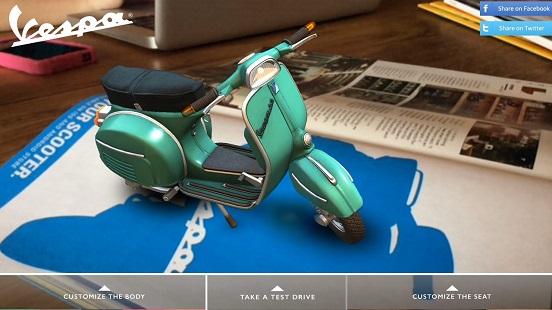
Vespa augmented reality campaign
Vespa augmented reality campaign
Vespa used AR in their print ads to let readers build custom scooters. Customers could choose colours, styles, and accessories, then get directions to their nearest dealer. This created a unique experience while making the path to purchase incredibly smooth.
<AcademyProTip>Always include clear, simple instructions on your printed materials. Something like "Download the Layar app and scan this icon to see our product in 3D" works perfectly.</AcademyProTip>
It's not too complicated - Photo by Samuel Zeller on Unsplash
Can I measure it in my marketing?#
Absolutely. One of AR's biggest advantages is its ability to drive people to digital properties where you can track everything.
You can measure how many people engaged with your AR experience and what actions they took afterwards. The key is proper setup.
Tag your URLs and create specific landing pages for your AR campaigns. Your analytics will then show you clicks, conversions, and other valuable metrics from your printed materials.
This data helps you determine ROI and refine future campaigns based on what actually works.
Why should I use it?#
AR printing increases engagement with your materials and strengthens brand recall. When done right, it drives meaningful actions.
The Nissan example shows how AR can boost test drive bookings by 65%. If you run an e-commerce site or generate leads online, AR can drive sales and capture qualified prospects.
AR also seamlessly connects your print and digital marketing channels. This creates a truly integrated omnichannel experience for your customers.
What are the challenges of Augmented Reality printing?#
Value versus gimmick. Technology should solve problems, not create them. Use AR to genuinely enhance your customer's experience and make desired actions easier. The Nissan and Vespa examples show how to add real value rather than just showing off.
Extra effort required. AR doesn't work with standard camera apps yet. Customers need to download specific apps first. While these apps are free, they do use data — something to consider for your South African audience.
Multiple apps. There's no universal AR app currently. You might ask customers to download yet another app, even if they already have AR capabilities. Choosing popular platforms like Layar helps reduce this friction.
Customer education. You need to clearly explain how and why customers should use the AR features. This means extra space on your printed materials for instructions and motivation.
<AcademyDadJoke>Why don't printers ever get lost in augmented reality? Because they always know where to find their bearings!</AcademyDadJoke>
The bottom line#
AR can significantly boost engagement with your print materials and increase marketing ROI. While there are challenges, the successful examples above show they're definitely manageable.
The technology is becoming more accessible, though you might need help from a graphic designer to create compelling experiences. Once you've got your AR campaign ready, we'll handle the printing perfectly.
Resources:
Print and Augmented Reality, a Match Made in Heaven
5 Print Campaigns That Used Augmented Reality
7 Cool Examples of Augmented Reality in Print
11 Creative Uses Of Augmented Reality In Marketing And Advertising
10 Things You Should Be Doing With Snapchat Snapcodes
Related:
[A printer's tips on <a href="https://www.printulu.co.za/product/flyers" class="internal-link text-[#007756] hover:text-[#005d42] underline font-medium">flyer</a> design, printing, and distribution](http://bit.ly/2Fb6QNz)
Counter Stands – How to maximise your point-of-sale advertising
The Complete Printing Guide[![Subscribe <a href="https://www.printulu.co.za/product/banners" class="internal-link text-[#007756] hover:text-[#005d42] underline font-medium">banner</a>](https://www.printulu.co.za/blog/wp-content/uploads/2019/05/Newsletter_Subscribe-01.png)](https://hello.printulu.co.za/popi-compliance--verify-your-email-address)