

Picture this:
You're about to learn everything about "Revolutionising Design Artificial Intelligence Tools" — without the jargon, without the fluff, and with at least one dad joke that'll make you groan. Grab your coffee. Let's go.
Key Takeaways
5 min read
- 1What you need to know before printing
- 2Common mistakes to avoid
- 3How to get the best results
Blog_ArtificialIntelligence
AI is transforming design for printing products, making the process faster, more efficient, and surprisingly more customisable than ever before.#
After 12 years in design, I'll admit I'm pretty particular about my tools (okay, maybe a bit snobby). I'm an Adobe Creative Suite loyalist through and through. But here's the thing — AI design tools are actually worth your attention.
<AcademyQuote> AI doesn't replace creativity; it amplifies it. The best designers use AI to handle the mundane so they can focus on the magic. </AcademyQuote>
Here's where artificial intelligence can genuinely enhance your design workflow:
- 1Design Assistance: AI suggests layout options, colour schemes, and fonts by analyzing customer preferences. This helps you create designs with higher success rates.
- 2Image Processing: Automatic background removal, contrast enhancement, and colour balance adjustments. No more spending hours on basic image cleanup.
- 3Automatic Layout Generation: AI generates optimised layouts for brochures, [<a href="https://www.printulu.co.za/product/flyers?utm_source=blog&utm_medium=content&utm_campaign=internal" class="internal-link text-[#007756] hover:text-[#005d42] underline font-medium">flyers</a>](https://www.printulu.co.za/product/flyers?utm_source=blog&utm_medium=content&utm_campaign=internal), or booklets based on content and format requirements.
- 4Custom Design Generation: Using customer data to create personalised <a href="https://www.printulu.co.za/product/business-cards?utm_source=blog&utm_medium=content&utm_campaign=internal" class="internal-link text-[#007756] hover:text-[#005d42] underline font-medium">business cards</a>, postcards, or <a href="https://www.printulu.co.za/product/banners?utm_source=blog&utm_medium=content&utm_campaign=internal" class="internal-link text-[#007756] hover:text-[#005d42] underline font-medium">banners</a> tailored to individual preferences.
- 5Design Optimization: AI analyzes designs for specific printing processes — whether offset or digital — ensuring your final product matches your vision.

I've tested several AI design tools and rated them out of five stars. Here's what actually works (and what doesn't).
Artificial Intelligence Tools:#
Most AI tools offer free credits for testing, but you'll need paid versions for continuous use.
Patterned.ai: (3.5 out of 5)#
Patterned.ai creates patterns using text prompts. Simple and straightforward to use. The paid version lets you download SVGs and edit colours — full editability is brilliant.
However, I can create patterns from scratch in Illustrator faster than this tool delivers what I envision. If you're new to pattern creation, this will be incredibly helpful. If you're experienced? Maybe not so much.
Stockimg: (3 out of 5)#
Creates custom visuals using prompts. Useful when you need something specific that doesn't exist in stock libraries. At about R330 for 500 credits (one credit per image), the question becomes: how many attempts will you need?
Limited editing capabilities mean you're stuck with what you get. My socks remained firmly un-rocked. You can see it in action here.
Playground AI (4.5 out of 5)#
Now we're talking! This tool offers regeneration options for different base ideas. You can modify specific elements, apply filters, and upscale images. I literally replaced my ginger cat with a mouse — it's that flexible.
The PRO plan unlocks higher-resolution downloads. This is where AI design tools start making real sense.
<AcademyProTip> When using AI image generators, start with detailed prompts but be prepared to iterate. The magic happens in the refinement, not the first attempt. </AcademyProTip>
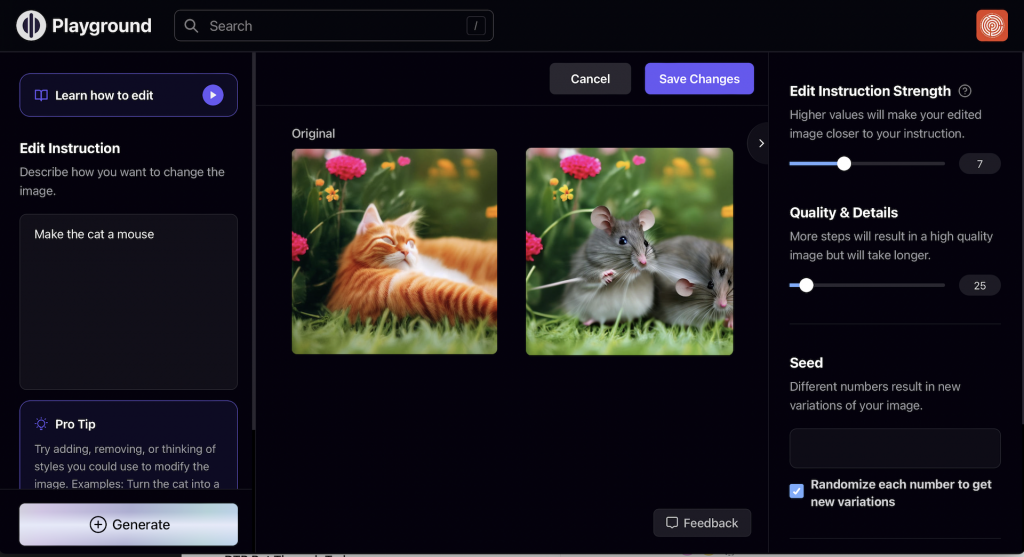
PlaygroundAI
Midjourney (4 out of 5)#
Incredibly creative and powerful, but feels like you need a computer science degree to operate it. The interface isn't intuitive — it's more like entering an alternate universe with its own rules.
The upside? You can generate completely unique content for free. Check out this tutorial if you're brave enough to venture in.
Khroma: (4.5 out of 5)#
This colour matching tool creates harmonious colour combinations you can save for future projects. It shows gradient possibilities and adapts images to your chosen colour schemes.
Makes creating cohesive designs faster and easier. Plus, it's user-friendly — no advanced degree required.
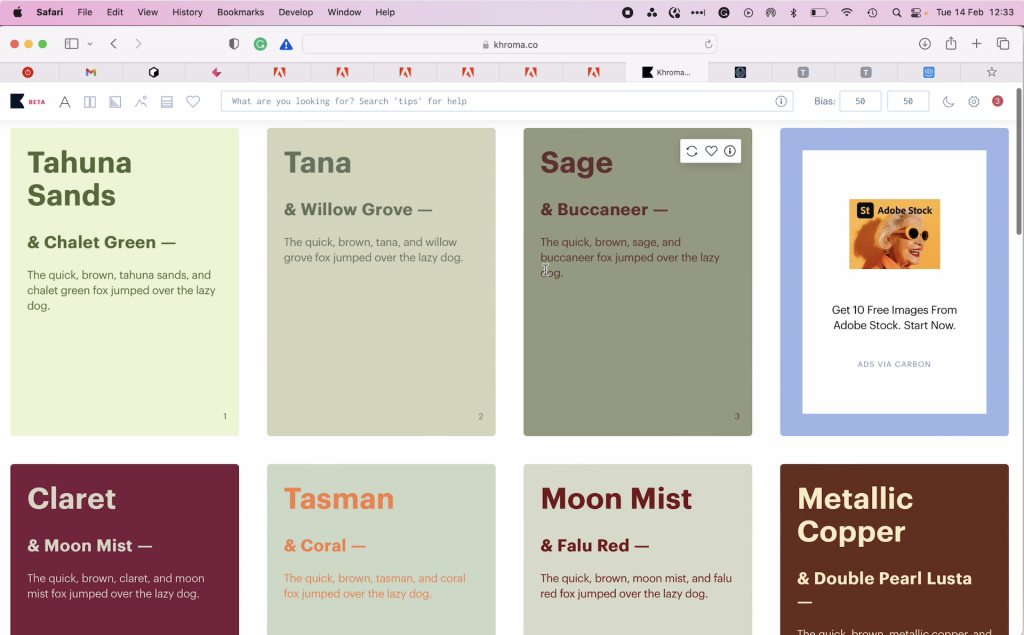
ColourPalette
Let's Enhance (5 out of 5)#
Perfect scores don't come easily from me, but this image upscaling tool earns it. Ever received an artwork problem report for low resolution? This solves that problem brilliantly.
Essential for large banners or chromadek signs where image quality matters. It genuinely improves print results.
Remove.bg (4.5 out of 5)#
Excellent background removal tool with one caveat — your original image needs clean separation between subject and background. Plain backgrounds work beautifully. Complex scenes with similar colours? Not so much.
Downloaded images might be small, but pair this with Let's Enhance and you're sorted.
<AcademyDadJoke> Why don't AI tools ever get tired? Because they never run out of processing power — unlike me after testing 20 different platforms! </AcademyDadJoke>
Alternative Background Removal Tool: Online Background Remover (5.5)#
Every designer and product seller needs background removal capabilities. This Background Remover actually outperformed the other AI tools I tested. More accurate and faster results.

AI enhances the design process for printing products in creative ways, making everything faster, more efficient, and more customisable. By using these tools strategically, you'll create higher-quality designs in less time — leading to happier customers and better profits for printing companies.